Wednesday, January 2, 2019

D365FO Retail topology and basic configuration.

 
https://dyn365site.wordpress.com/2017/10/20/different-architecture-topology-for-dynamics-365-retail/

Thursday, December 20, 2018

call directly Ax specific form by clicking Ax icon without navigating in Ax module.

There is a requirement for one of client to open directly Job registration form by clicking Ax icon in desktop.
To Acheive these you have to do below changes.

1.Create a text file and enter the below script and save as JobRegistration.xml.


<?xml version="1.0" ?>
<AxaptaAutoRun
logfile="C:\\Users\\axtest1\\JobRegistrationLog.log"
logToScreen="false"
version="6.2"
exitWhenDone="false">
<Run type="displayMenuItem" name="JmgRegistrationClockInOut"/>
</AxaptaAutoRun>

2.Go to the Ax client configuration and create a new configuration and specify below

Command to run at the Application startup: AutoRun_C:\Users\axtest1\JobRegistration.xml

save the file as .axc in desktop.

Now you are done,click on the newly created .axc file and it will open directly Ax JmgRegistrationClockInOut form.


X++ job to delete data based on table prefix(cust/vend/kanban etc)

 In the below job we are deleting all data related to Kanban (prefix).you can use it for different prefix,just change the prefix in the code.

static void KanbanDelete(Args _args)
{
   
    int i =1;
    #AviFiles
    SysOperationProgress progress = new SysOperationProgress();
    Common common;
    #AOT
    Name name;
    NumberOf recordCount;
    TreeNode treeNode;
    SysDictTable sysDictTable;
    Connection      connection;
    Statement       statement;
    str             query;
    DataAreaId      currentDataArea;
    ;
    progress.setCaption("Loading…");
    progress.setAnimation(#AviUpdate);

    treeNode = TreeNode::findNode(#TablesPath);
    treeNode =  treeNode.AOTfirstChild();
    progress.setTotal(treeNode.AOTchildNodeCount());
    while (treeNode)
    {
        name = treeNode.AOTname();
        if(name like "kanban")
        {
            sysDictTable = SysDictTable::newTableId(treeNode.applObjectId());
            recordCount = sysDictTable.recordCount();
            if (recordCount)
            {
                connection = new Connection();
                statement = connection.createStatement();
                currentDataArea = curext();
                query = "delete from "+name;
                new SqlStatementExecutePermission(query).assert();
                statement.executeUpdate(query);
                CodeAccessPermission::revertAssert();
            }
        }
        progress.setText(strFmt("%1" ,name));
        progress.setCount(i, 1);
        i++;
        treeNode = treeNode.AOTnextSibling();
    }

}

Saturday, August 13, 2016

Test a WebService without any code and later consume in AX.

Hello Friends,

In our current Project we have a huge integration and get several web service call.
To validate the Web service before consuming through ax ,we can use different methodology.
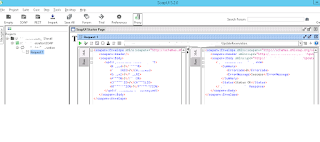
1.SOAP UI :
Click the SOAP and Add the given WSDL  and press enter.
click on the operation and right side window will come.
enter the input request and run it.
right side you will get the response in the xml format.
 
2.WCF Test Client:
If VS is installed in your system ,then by default it will install WCF test client 
C:\Program Files (x86)\Microsoft Visual Studio 12.0\Common7\IDE
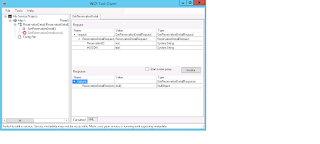
 
Add the WSDL under File>Add service and press enter.
Pass the input top panel and see the response in the below panel.

Once the outcomes is tested and validated,
you can the webService WSDL in Service Reference of a VS project.
Build the solution and deploy and Add to AOT.
It will reflect in AX under VS project area(Csharp projects)
Restart the client ,then only impact can be observe via code level.
Now you are ready to use the Web service through AX business logic.

Deploying all SSRS reports or single report in D365FSCM Using PowerShell.

  All reports can be deployed using following commands . 1. Open PowerShell run as administrator  2.Copy and paste below command and enter....